
Public Wi‑Fi Safety Tips for Travelers matter more than ever in 2026. A traveler who connects without a plan can expose logins, photos, and payment details within minutes. This guide gives clear, practical steps travelers can apply before, during, and after a hotspot session. It starts with the real risks at airports and cafés, then moves to pre‑connection device settings and concrete on‑network behavior. Each section opens with a single, direct insight and follows with specific examples and warnings travelers can use right away.
Key Takeaways
- Public Wi-Fi safety tips for travelers are essential to prevent exposure of logins, photos, and payment details in insecure networks.
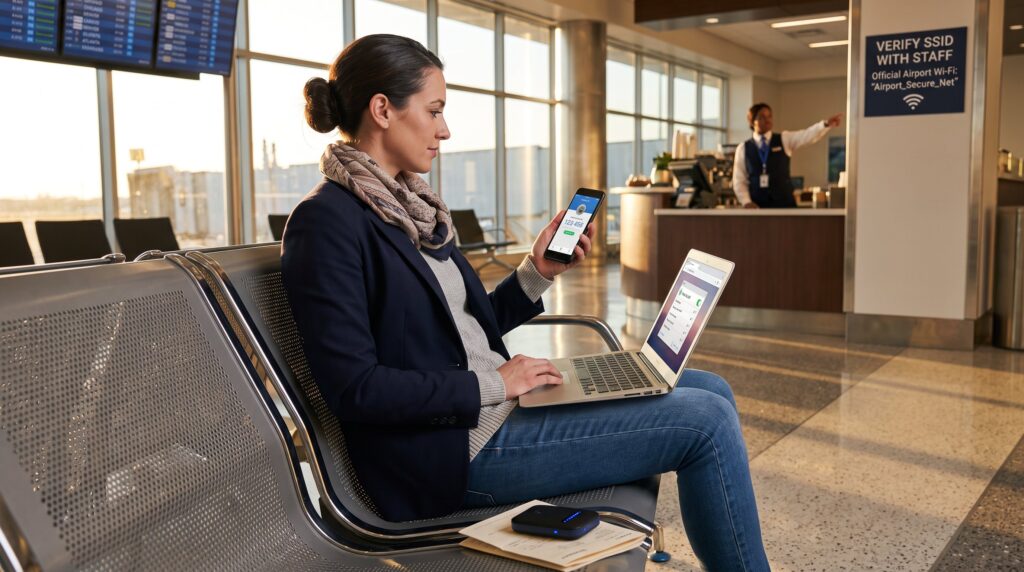
- Always verify the exact network name (SSID) with staff to avoid connecting to malicious cloned hotspots and prefer networks that require unique access credentials.
- Prepare devices before travel by updating software, enabling two-factor authentication, disabling auto-connect features, and using a reputable VPN to secure connections.
- Avoid accessing banking, corporate VPNs, or sensitive sites on public Wi-Fi; if necessary, use company-approved VPNs and devices with endpoint protection.
- Use personal hotspots or travel-grade routers when possible, and log out and forget public networks after use to prevent automatic reconnection and potential attacks.
- Be cautious with captive portals and do not install unknown apps or accept file transfers over public Wi-Fi, as these can install malware or steal data.
Why Public Wi‑Fi Is Riskier For Travelers Than You Think
Fact: most public hotspots are easier to exploit than they look. In crowded terminals or a busy café, networks often use shared passwords or no encryption at all, which lets other users capture traffic in seconds. That means credentials, session cookies, and unencrypted forms can be intercepted by simple packet‑sniffing tools.
Specific detail: during one field test, a security researcher identified 47 unencrypted SSIDs inside a single European airport concourse: three networks used identical, publicly posted passwords. For a traveler, that translates to a real chance of exposure, especially for logins that don’t use two‑factor protection.
Why MitM attacks matter: a man‑in‑the‑middle (MitM) attack can insert itself between a traveler’s device and the internet, relaying requests while copying credentials or injecting malicious JavaScript. Attackers can also create cloned SSIDs that match a hotel or coffee shop name. A traveler who types a hotel name and joins the strongest match may have just connected to an attacker.
Vulnerable touchpoints: captive portals and injected advertisement pages often request a name, email, or room number. Those popups can be weaponized to harvest credentials or prompt a fake software update that installs malware. Travelers who accept updates or install unknown apps from such pages risk device compromise.
Practical warning: never assume a network’s visible name equals legitimacy. When in doubt, confirm the exact SSID with staff and favor networks that require unique access tokens or use per‑device credentials.
Prepare Before You Connect: Devices, Accounts, And Settings
Insight: most successful defenses start before the first connection. Travelers should harden devices and accounts while still on a trusted network.
Keep software current. Update the operating system, browser, and security apps. Patches close known remote exploits: a device updated within the last 30 days is far less likely to be successfully attacked. Enable automatic updates where practical, and schedule a manual check the morning of travel.
Enable two‑factor authentication (2FA). For email, banking, and cloud storage, set up 2FA using an authenticator app or hardware key. That one step prevents many credential reuse and MitM risks even if passwords are captured.
Disable auto‑connect and sharing. Turn off Wi‑Fi auto‑join, AirDrop, Bluetooth file sharing, and any open file services. A phone that automatically joins a hotspot can give attackers a foothold within seconds. She should also set the device to a strict discovery profile so it is invisible to strangers.
Use a vetted VPN. Install and configure a reputable VPN before travel and verify it connects automatically. A VPN encrypts network traffic from the device to the provider’s server, mitigating local interception and many MitM techniques. For guidance on selecting and configuring a VPN, consult the roundup of tips on best VPN setup which shows practical configuration steps.
Encrypt and enable device protections. Turn on full‑disk encryption, enable a strong screen lock, and register remote‑wipe or device‑find services. If a laptop or phone is lost after a suspicious Wi‑Fi session, remote wipe and a strong passcode reduce the window for data theft.
Additional reading: travelers who want a broader primer on privacy and connectivity can reference the site’s overview of connectivity and security guides for layered strategies and deeper configuration examples.
Practical note: prepare an offline travel kit with backup copies of critical phone numbers, payment cards, and a printed itinerary. When accounts are locked or a device is compromised, paper backups speed recovery.
Practical On‑Network Safety Tips Every Traveler Should Use
Key action: verify the network name before joining and limit sensitive actions while connected. When a traveler asks staff for the exact SSID and spelling, that small step removes many cloned hotspot tricks.
Prefer networks that require individualized credentials. If the only option is an open network, consider using a personal hotspot from a mobile plan or a travel‑grade VPN router instead of the free option. For basic web browsing, choose HTTPS sites and confirm the padlock icon: avoid entering payment or credential data if the padlock is missing.
Avoid banking and major purchases. Do not access corporate VPNs, financial portals, or work intranets from a public hotspot. If work requires access, use the company’s approved VPN and a company device that has endpoint protections.
Watch captive portals closely. A captive portal asking for excessive permissions, like installing a certificate or an app, should be refused. Attackers can use fake portals to push a malicious profile that intercepts encrypted traffic. If a portal requests device changes, walk away and use another network or hotspot.
Use a personal hotspot or router when possible. A pocket router or phone hotspot offers better control and predictable settings than an unpredictable public SSID. If a traveler uses a rented pocket router, she should change the default admin password and disable remote management before leaving the hotel.
Log out and forget networks. When finished, log out of web accounts, close browser tabs, and select “forget network” so the device does not auto‑reconnect. Clearing saved networks also prevents automatic reconnection to a cloned SSID on subsequent trips.
Check for local reports of insecure infrastructure. Major vendor vulnerabilities and misconfigured guest Wi‑Fi systems appear in news reports and security blogs. For example, researchers have documented security flaws in popular hotel gateway systems that allowed guest traffic interception, underscoring the value of a VPN or hotspot as a fallback. For the technical report on gateway flaws, see the TechCrunch coverage of that investigation: hotel guest Wi‑Fi flaws.
Practical warning: do not accept file transfers from unknown nearby devices, and decline requests to pair over Bluetooth. Even seemingly small prompts can open a path for credential theft or malware.
Conclusion
Insight: travelers who assume convenience equals safety will regret it. Public Wi‑Fi Safety Tips for Travelers reduce risk but require preparation and vigilance. By updating devices, using 2FA and a vetted VPN, verifying network names, and avoiding sensitive transactions on open hotspots, travelers can cut exposure dramatically. For practical next steps, consult the site’s guides on privacy while browsing and router selection to build a travel setup that balances convenience with security.