
Best AI Tools for Character Consistency in Videos
Creating the same character across multiple video scenes is one of the biggest challenges in AI video production. A character may look perfect in one shot but change facial details, clothing, hairstyle, or overall appearance in the next scene. This becomes a serious problem for filmmakers, brands, and creators producing longer stories, campaigns, or episodic content.
Character consistency tools solve this challenge by helping creators maintain the identity of people, mascots, products, and visual worlds across different shots. The right tool can reduce repeated manual corrections and make AI video workflows more reliable.
In this guide, we compare the best AI tools for character consistency in videos based on their consistency features, workflow support, ease of use, creative control, and practical use cases.
How We Evaluated These Tools
We evaluated each tool based on:
- Character reference and identity preservation
- Support for multiple scenes and longer projects
- Control over wardrobe, locations, and visual style
- Workflow speed and creative flexibility
- Suitability for filmmakers, marketers, and creators
Best AI Tools for Character Consistency in Videos
| Tool | Best For | Key Strength |
| Invideo Agent | Filmmaking, brand films, episodic videos | Project memory and full character continuity |
| Scenario | Game and creative asset consistency | Character and style references |
| Leonardo AI | Character design and visual development | Consistent image generation workflows |
| Krea AI | Creative exploration and visual refinement | Real-time AI visuals and references |
| Pika | Short-form AI video creation | Fast character-focused video generation |
| LTX Studio | Story-based video planning | Character-driven storytelling workflows |
1. Invideo Agent
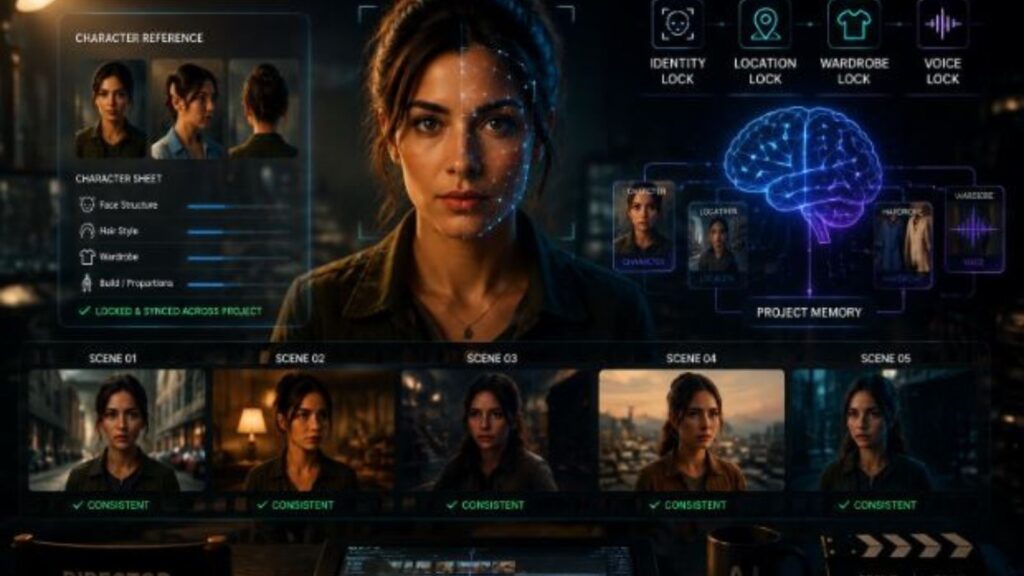
Invideo Agent is designed for creators who need characters, locations, and visual details to remain consistent throughout an entire project. Instead of treating every shot as a separate generation, invideo Agent remembers the project context and keeps important creative decisions connected across scenes.
Key Points
- Maintains character identity across multiple shots
- Stores character sheets, locations, references, and project rules
- Supports full video production workflows
- Helps creators direct instead of repeatedly rewriting prompts
Features
Invideo Agent holds your characters, your world, and your voices across every shot, allowing creators to focus on directing rather than manually checking continuity. It creates persistent character references, so details such as facial structure, appearance, and defining features can remain consistent from the first scene to the final frame.
The workflow is built around project memory. Creators can establish characters and locations once, and the system continues using those references throughout the project. It can also review generated shots, identify unwanted changes, and regenerate scenes when important details do not match the defined character.
For filmmakers, invideo Agent works more like a creative collaborator than a simple generation tool. It helps with development, planning, character creation, continuity, editing, and finishing workflows while keeping the broader project context connected.
Invideo Agent Two expands the workflow by adding stronger project memory, expert agents, and the ability to work with different project materials such as scripts, PDFs, videos, and brand documents. It can remember creative decisions, connect specialized agents, and help maintain consistency throughout complex productions.
Best For
- Short films and episodic content
- Brand films
- Microdramas
- Marketing videos requiring repeated characters
Use Cases
Creators can use invideo Agent for maintaining character consistency across scenes, building consistent brand mascots, creating product-focused videos, and developing stories where the same characters appear over a longer timeline.
Businesses create better visuals faster by reducing repetitive production work and keeping brand elements consistent across multiple creative outputs. This approach helps teams produce more variations without rebuilding the visual foundation every time.
Where It Falls Short
Creators making a single short clip may not need a full project memory workflow. The biggest benefits appear when a project requires multiple scenes, characters, or revisions.
Pricing
Pricing depends on the selected invideo plan and usage requirements.
2. Scenario
Scenario focuses on creating consistent visual assets by allowing creators to train custom AI models around specific artistic styles and characters. It is commonly used by game developers, designers, and creative teams that need repeatable character designs.
Key Points
- Custom AI models for visual consistency
- Character and style training
- Focus on image-based creative assets
Features
Scenario allows creators to build custom models using their own reference material. This helps maintain a similar appearance across generated assets, making it useful for characters, environments, and creative collections.
Best For
- Game development teams
- Digital artists
- Visual asset creation
Use Cases
Creators can use Scenario for designing characters, generating variations, and maintaining a consistent art direction across multiple assets.
Where It Falls Short
It is mainly focused on visual asset generation rather than complete video production workflows with scene planning and editing.
Pricing
The chosen plan and usage determine the price.
3. Leonardo AI
Leonardo AI is an AI image creation platform that supports character development through reference images and creative controls. It is useful for building consistent character concepts before turning them into larger visual projects.
Key Points
- Strong image generation capabilities
- Character concept development
- Style control options
Features
Leonardo AI provides tools for creating repeatable visual styles and character designs. Reference-based workflows help creators maintain a similar look across multiple generations.
Best For
- Character artists
- Designers
- Concept creators
Use Cases
It works well for creating character sheets, visual concepts, and early-stage development assets for videos and creative projects.
Where It Falls Short
Creators working on full video sequences may need additional tools for motion consistency, editing, and scene management.
Pricing
Pricing depends on available subscription plans and usage limits.
4. Krea AI
Krea AI helps creators explore and refine AI-generated visuals with a focus on real-time creative workflows. It can support character design by helping users maintain a visual direction during the creation process.
Key Points
- Real-time visual generation
- Creative exploration
- Reference-based workflows
Features
Krea AI offers tools for improving and refining generated visuals. Its workflow is useful for creators who want to experiment with character styles and maintain a consistent visual identity.
Best For
- Designers
- Content creators
- Visual experimenters
Use Cases
Creators can use Krea AI for developing character looks, refining visual concepts, and exploring different creative directions.
Where It Falls Short
It may require additional production tools when managing complex stories with multiple scenes and long-term character continuity.
Pricing
Pricing depends on the selected subscription option.
5. Pika
Pika is an AI video creation tool focused on generating short videos from creative ideas. It can help creators bring characters into motion quickly and experiment with different video concepts.
Key Points
- Fast AI video generation
- Short-form content creation
- Simple creative workflows
Features
Pika provides tools for transforming ideas and images into animated video clips. It is useful for creators who want quick visual results and short content formats.
Best For
- Social media creators
- Short video projects
- Creative experiments
Use Cases
Creators can use Pika for social clips, animated concepts, and quick character-focused videos.
Where It Falls Short
Long-form storytelling projects may require stronger continuity systems for keeping characters identical across many scenes.
Pricing
Pricing depends on the available plans and usage.
6. LTX Studio
LTX Studio focuses on story driven AI video creation by helping creators plan scenes, characters, and visual sequences. It is designed for creators who want to organize storytelling before production.
Key Points
- Story planning workflow
- Character-focused projects
- Scene development support
Features
LTX Studio helps creators visualize stories by organizing characters, scenes, and cinematic elements. It supports early production planning and helps creators understand how a project will develop.
Best For
- Story creators
- Filmmakers
- Pre-production teams
Use Cases
Creators can use it for planning narrative videos, exploring scenes, and developing character-based stories.
Where It Falls Short
Creators looking for advanced character memory across full productions may need a tool focused specifically on long-term project consistency.
Pricing
Pricing depends on the selected plan.
How to Choose the Right Tool for Character Consistency
Choosing the right AI tool depends on the type of project you are creating.
Choose a project memory-focused tool when:
- You are creating films, series, or multi-scene videos
- Characters appear repeatedly throughout a story
- Brand consistency matters across campaigns
Choose an image-focused tool when:
- You need character concepts or visual development
- You are building assets before video production
Choose a short video generation tool when:
- You mainly create social media clips
- You need fast experiments and short content
Common Mistakes to Avoid
- Choosing a tool based only on generation speed
- Ignoring character references and project memory features
- Creating long projects without defining visual rules early
- Expecting every AI video tool to maintain identity automatically
Final Thoughts
Character consistency is becoming one of the most important parts of AI video creation. A strong tool should not only generate attractive visuals but also help creators maintain identity, style, and storytelling continuity.
Invideo Agent stands out for projects where characters need to remain consistent across multiple scenes because it combines character references, project memory, and production workflows in one environment.
Other tools can be valuable for specific needs such as visual development, short clips, or creative exploration. The best choice depends on whether you are creating a single video or building a complete visual world.
FAQs
How does AI maintain character consistency in videos?
AI character consistency tools use reference images, character data, and project information to keep important details stable. These details can include facial features, clothing, style, and visual identity across different scenes.
Why is character consistency difficult in AI videos?
AI video systems generate each scene based on available instructions and references. Without strong continuity controls, small details can change between shots, making characters appear different.
Can AI tools keep the same character across multiple episodes?
Yes, some AI tools support longer projects by storing character references and creative decisions. This allows creators to reuse the same character identity across different scenes and episodes.
Are AI character consistency tools useful for brands?
Yes. Brands can use these tools to maintain consistent mascots, products, and visual styles across advertisements, social content, and campaigns.
Should creators use one AI tool for the entire video workflow?
Not always. The right choice depends on the project. Some creators need specialized tools for images, planning, or editing, while others benefit from an integrated workflow.Creating the same character across multiple video scenes is one of the biggest challenBest AI Tools for Character Consistency in Videos
Creating the same character across multiple video scenes is one of the biggest challenges in AI video production. A character may look perfect in one shot but change facial details, clothing, hairstyle, or overall appearance in the next scene. This becomes a serious problem for filmmakers, brands, and creators producing longer stories, campaigns, or episodic content.
Character consistency tools solve this challenge by helping creators maintain the identity of people, mascots, products, and visual worlds across different shots. The right tool can reduce repeated manual corrections and make AI video workflows more reliable.
In this guide, we compare the best AI tools for character consistency in videos based on their consistency features, workflow support, ease of use, creative control, and practical use cases.
How We Evaluated These Tools
We evaluated each tool based on:
- Character reference and identity preservation
- Support for multiple scenes and longer projects
- Control over wardrobe, locations, and visual style
- Workflow speed and creative flexibility
- Suitability for filmmakers, marketers, and creators
Best AI Tools for Character Consistency in Videos
| Tool | Best For | Key Strength |
| Invideo Agent | Filmmaking, brand films, episodic videos | Project memory and full character continuity |
| Scenario | Game and creative asset consistency | Character and style references |
| Leonardo AI | Character design and visual development | Consistent image generation workflows |
| Krea AI | Creative exploration and visual refinement | Real-time AI visuals and references |
| Pika | Short-form AI video creation | Fast character-focused video generation |
| LTX Studio | Story-based video planning | Character-driven storytelling workflows |
1. Invideo Agent
Invideo Agent is designed for creators who need characters, locations, and visual details to remain consistent throughout an entire project. Instead of treating every shot as a separate generation, invideo Agent remembers the project context and keeps important creative decisions connected across scenes.
Key Points
- Maintains character identity across multiple shots
- Stores character sheets, locations, references, and project rules
- Supports full video production workflows
- Helps creators direct instead of repeatedly rewriting prompts
Features
Invideo Agent holds your characters, your world, and your voices across every shot, allowing creators to focus on directing rather than manually checking continuity. It creates persistent character references, so details such as facial structure, appearance, and defining features can remain consistent from the first scene to the final frame.
The workflow is built around project memory. Creators can establish characters and locations once, and the system continues using those references throughout the project. It can also review generated shots, identify unwanted changes, and regenerate scenes when important details do not match the defined character.
For filmmakers, invideo Agent works more like a creative collaborator than a simple generation tool. It helps with development, planning, character creation, continuity, editing, and finishing workflows while keeping the broader project context connected.
Invideo Agent Two expands the workflow by adding stronger project memory, expert agents, and the ability to work with different project materials such as scripts, PDFs, videos, and brand documents. It can remember creative decisions, connect specialized agents, and help maintain consistency throughout complex productions.
Best For
- Short films and episodic content
- Brand films
- Microdramas
- Marketing videos requiring repeated characters
Use Cases
Creators can use invideo Agent for maintaining character consistency across scenes, building consistent brand mascots, creating product-focused videos, and developing stories where the same characters appear over a longer timeline.
Businesses create better visuals faster by reducing repetitive production work and keeping brand elements consistent across multiple creative outputs. This approach helps teams produce more variations without rebuilding the visual foundation every time.
Where It Falls Short
Creators making a single short clip may not need a full project memory workflow. The biggest benefits appear when a project requires multiple scenes, characters, or revisions.
Pricing
Pricing depends on the selected invideo plan and usage requirements.
2. Scenario
Scenario focuses on creating consistent visual assets by allowing creators to train custom AI models around specific artistic styles and characters. It is commonly used by game developers, designers, and creative teams that need repeatable character designs.
Key Points
- Custom AI models for visual consistency
- Character and style training
- Focus on image-based creative assets
Features
Scenario allows creators to build custom models using their own reference material. This helps maintain a similar appearance across generated assets, making it useful for characters, environments, and creative collections.
Best For
- Game development teams
- Digital artists
- Visual asset creation
Use Cases
Creators can use Scenario for designing characters, generating variations, and maintaining a consistent art direction across multiple assets.
Where It Falls Short
It is mainly focused on visual asset generation rather than complete video production workflows with scene planning and editing.
Pricing
The chosen plan and usage determine the price.
3. Leonardo AI
Leonardo AI is an AI image creation platform that supports character development through reference images and creative controls. It is useful for building consistent character concepts before turning them into larger visual projects.
Key Points
- Strong image generation capabilities
- Character concept development
- Style control options
Features
Leonardo AI provides tools for creating repeatable visual styles and character designs. Reference-based workflows help creators maintain a similar look across multiple generations.
Best For
- Character artists
- Designers
- Concept creators
Use Cases
It works well for creating character sheets, visual concepts, and early-stage development assets for videos and creative projects.
Where It Falls Short
Creators working on full video sequences may need additional tools for motion consistency, editing, and scene management.
Pricing
Pricing depends on available subscription plans and usage limits.
4. Krea AI
Krea AI helps creators explore and refine AI-generated visuals with a focus on real-time creative workflows. It can support character design by helping users maintain a visual direction during the creation process.
Key Points
- Real-time visual generation
- Creative exploration
- Reference-based workflows
Features
Krea AI offers tools for improving and refining generated visuals. Its workflow is useful for creators who want to experiment with character styles and maintain a consistent visual identity.
Best For
- Designers
- Content creators
- Visual experimenters
Use Cases
Creators can use Krea AI for developing character looks, refining visual concepts, and exploring different creative directions.
Where It Falls Short
It may require additional production tools when managing complex stories with multiple scenes and long-term character continuity.
Pricing
Pricing depends on the selected subscription option.
5. Pika
Pika is an AI video creation tool focused on generating short videos from creative ideas. It can help creators bring characters into motion quickly and experiment with different video concepts.
Key Points
- Fast AI video generation
- Short-form content creation
- Simple creative workflows
Features
Pika provides tools for transforming ideas and images into animated video clips. It is useful for creators who want quick visual results and short content formats.
Best For
- Social media creators
- Short video projects
- Creative experiments
Use Cases
Creators can use Pika for social clips, animated concepts, and quick character-focused videos.
Where It Falls Short
Long-form storytelling projects may require stronger continuity systems for keeping characters identical across many scenes.
Pricing
Pricing depends on the available plans and usage.
6. LTX Studio
LTX Studio focuses on story driven AI video creation by helping creators plan scenes, characters, and visual sequences. It is designed for creators who want to organize storytelling before production.
Key Points
- Story planning workflow
- Character-focused projects
- Scene development support
Features
LTX Studio helps creators visualize stories by organizing characters, scenes, and cinematic elements. It supports early production planning and helps creators understand how a project will develop.
Best For
- Story creators
- Filmmakers
- Pre-production teams
Use Cases
Creators can use it for planning narrative videos, exploring scenes, and developing character-based stories.
Where It Falls Short
Creators looking for advanced character memory across full productions may need a tool focused specifically on long-term project consistency.
Pricing
Pricing depends on the selected plan.
How to Choose the Right Tool for Character Consistency
Choosing the right AI tool depends on the type of project you are creating.
Choose a project memory-focused tool when:
- You are creating films, series, or multi-scene videos
- Characters appear repeatedly throughout a story
- Brand consistency matters across campaigns
Choose an image-focused tool when:
- You need character concepts or visual development
- You are building assets before video production
Choose a short video generation tool when:
- You mainly create social media clips
- You need fast experiments and short content
Common Mistakes to Avoid
- Choosing a tool based only on generation speed
- Ignoring character references and project memory features
- Creating long projects without defining visual rules early
- Expecting every AI video tool to maintain identity automatically
Final Thoughts
Character consistency is becoming one of the most important parts of AI video creation. A strong tool should not only generate attractive visuals but also help creators maintain identity, style, and storytelling continuity.
Invideo Agent stands out for projects where characters need to remain consistent across multiple scenes because it combines character references, project memory, and production workflows in one environment.
Other tools can be valuable for specific needs such as visual development, short clips, or creative exploration. The best choice depends on whether you are creating a single video or building a complete visual world.
FAQs
How does AI maintain character consistency in videos?
AI character consistency tools use reference images, character data, and project information to keep important details stable. These details can include facial features, clothing, style, and visual identity across different scenes.
Why is character consistency difficult in AI videos?
AI video systems generate each scene based on available instructions and references. Without strong continuity controls, small details can change between shots, making characters appear different.
Can AI tools keep the same character across multiple episodes?
Yes, some AI tools support longer projects by storing character references and creative decisions. This allows creators to reuse the same character identity across different scenes and episodes.
Are AI character consistency tools useful for brands?
Yes. Brands can use these tools to maintain consistent mascots, products, and visual styles across advertisements, social content, and campaigns.
Should creators use one AI tool for the entire video workflow?
Not always. The right choice depends on the project. Some creators need specialized tools for images, planning, or editing, while others benefit from an integrated workflow.ges in AI video production. A character may look perfect in one shot but change facial details, clothing, hairstyle, or overall appearance in the next scene. This becomes a serious problem for filmmakers, brands, and creators producing longer stories, campaigns, or episodic content.
Character consistency tools solve this challenge by helping creators maintain the identity of people, mascots, products, and visual worlds across different shots. The right tool can reduce repeated manual corrections and make AI video workflows more reliable.
In this guide, we compare the best AI tools for character consistency in videos based on their consistency features, workflow support, ease of use, creative control, and practical use cases.
How We Evaluated These Tools
We evaluated each tool based on:
- Character reference and identity preservation
- Support for multiple scenes and longer projects
- Control over wardrobe, locations, and visual style
- Workflow speed and creative flexibility
- Suitability for filmmakers, marketers, and creators
Best AI Tools for Character Consistency in Videos
| Tool | Best For | Key Strength |
| Invideo Agent | Filmmaking, brand films, episodic videos | Project memory and full character continuity |
| Scenario | Game and creative asset consistency | Character and style references |
| Leonardo AI | Character design and visual development | Consistent image generation workflows |
| Krea AI | Creative exploration and visual refinement | Real-time AI visuals and references |
| Pika | Short-form AI video creation | Fast character-focused video generation |
| LTX Studio | Story-based video planning | Character-driven storytelling workflows |
1. Invideo Agent
Invideo Agent is designed for creators who need characters, locations, and visual details to remain consistent throughout an entire project. Instead of treating every shot as a separate generation, invideo Agent remembers the project context and keeps important creative decisions connected across scenes.
Key Points
- Maintains character identity across multiple shots
- Stores character sheets, locations, references, and project rules
- Supports full video production workflows
- Helps creators direct instead of repeatedly rewriting prompts
Features
Invideo Agent holds your characters, your world, and your voices across every shot, allowing creators to focus on directing rather than manually checking continuity. It creates persistent character references, so details such as facial structure, appearance, and defining features can remain consistent from the first scene to the final frame.
The workflow is built around project memory. Creators can establish characters and locations once, and the system continues using those references throughout the project. It can also review generated shots, identify unwanted changes, and regenerate scenes when important details do not match the defined character.
For filmmakers, invideo Agent works more like a creative collaborator than a simple generation tool. It helps with development, planning, character creation, continuity, editing, and finishing workflows while keeping the broader project context connected.
Invideo Agent Two expands the workflow by adding stronger project memory, expert agents, and the ability to work with different project materials such as scripts, PDFs, videos, and brand documents. It can remember creative decisions, connect specialized agents, and help maintain consistency throughout complex productions.
Best For
- Short films and episodic content
- Brand films
- Microdramas
- Marketing videos requiring repeated characters
Use Cases
Creators can use invideo Agent for maintaining character consistency across scenes, building consistent brand mascots, creating product-focused videos, and developing stories where the same characters appear over a longer timeline.
Businesses create better visuals faster by reducing repetitive production work and keeping brand elements consistent across multiple creative outputs. This approach helps teams produce more variations without rebuilding the visual foundation every time.
Where It Falls Short
Creators making a single short clip may not need a full project memory workflow. The biggest benefits appear when a project requires multiple scenes, characters, or revisions.
Pricing
Pricing depends on the selected invideo plan and usage requirements.
2. Scenario
Scenario focuses on creating consistent visual assets by allowing creators to train custom AI models around specific artistic styles and characters. It is commonly used by game developers, designers, and creative teams that need repeatable character designs.
Key Points
- Custom AI models for visual consistency
- Character and style training
- Focus on image-based creative assets
Features
Scenario allows creators to build custom models using their own reference material. This helps maintain a similar appearance across generated assets, making it useful for characters, environments, and creative collections.
Best For
- Game development teams
- Digital artists
- Visual asset creation
Use Cases
Creators can use Scenario for designing characters, generating variations, and maintaining a consistent art direction across multiple assets.
Where It Falls Short
It is mainly focused on visual asset generation rather than complete video production workflows with scene planning and editing.
Pricing
The chosen plan and usage determine the price.
3. Leonardo AI
Leonardo AI is an AI image creation platform that supports character development through reference images and creative controls. It is useful for building consistent character concepts before turning them into larger visual projects.
Key Points
- Strong image generation capabilities
- Character concept development
- Style control options
Features
Leonardo AI provides tools for creating repeatable visual styles and character designs. Reference-based workflows help creators maintain a similar look across multiple generations.
Best For
- Character artists
- Designers
- Concept creators
Use Cases
It works well for creating character sheets, visual concepts, and early-stage development assets for videos and creative projects.
Where It Falls Short
Creators working on full video sequences may need additional tools for motion consistency, editing, and scene management.
Pricing
Pricing depends on available subscription plans and usage limits.
4. Krea AI
Krea AI helps creators explore and refine AI-generated visuals with a focus on real-time creative workflows. It can support character design by helping users maintain a visual direction during the creation process.
Key Points
- Real-time visual generation
- Creative exploration
- Reference-based workflows
Features
Krea AI offers tools for improving and refining generated visuals. Its workflow is useful for creators who want to experiment with character styles and maintain a consistent visual identity.
Best For
- Designers
- Content creators
- Visual experimenters
Use Cases
Creators can use Krea AI for developing character looks, refining visual concepts, and exploring different creative directions.
Where It Falls Short
It may require additional production tools when managing complex stories with multiple scenes and long-term character continuity.
Pricing
Pricing depends on the selected subscription option.
5. Pika
Pika is an AI video creation tool focused on generating short videos from creative ideas. It can help creators bring characters into motion quickly and experiment with different video concepts.
Key Points
- Fast AI video generation
- Short-form content creation
- Simple creative workflows
Features
Pika provides tools for transforming ideas and images into animated video clips. It is useful for creators who want quick visual results and short content formats.
Best For
- Social media creators
- Short video projects
- Creative experiments
Use Cases
Creators can use Pika for social clips, animated concepts, and quick character-focused videos.
Where It Falls Short
Long-form storytelling projects may require stronger continuity systems for keeping characters identical across many scenes.
Pricing
Pricing depends on the available plans and usage.
6. LTX Studio
LTX Studio focuses on story driven AI video creation by helping creators plan scenes, characters, and visual sequences. It is designed for creators who want to organize storytelling before production.
Key Points
- Story planning workflow
- Character-focused projects
- Scene development support
Features
LTX Studio helps creators visualize stories by organizing characters, scenes, and cinematic elements. It supports early production planning and helps creators understand how a project will develop.
Best For
- Story creators
- Filmmakers
- Pre-production teams
Use Cases
Creators can use it for planning narrative videos, exploring scenes, and developing character-based stories.
Where It Falls Short
Creators looking for advanced character memory across full productions may need a tool focused specifically on long-term project consistency.
Pricing
Pricing depends on the selected plan.
How to Choose the Right Tool for Character Consistency
Choosing the right AI tool depends on the type of project you are creating.
Choose a project memory-focused tool when:
- You are creating films, series, or multi-scene videos
- Characters appear repeatedly throughout a story
- Brand consistency matters across campaigns
Choose an image-focused tool when:
- You need character concepts or visual development
- You are building assets before video production
Choose a short video generation tool when:
- You mainly create social media clips
- You need fast experiments and short content
Common Mistakes to Avoid
- Choosing a tool based only on generation speed
- Ignoring character references and project memory features
- Creating long projects without defining visual rules early
- Expecting every AI video tool to maintain identity automatically
Final Thoughts
Character consistency is becoming one of the most important parts of AI video creation. A strong tool should not only generate attractive visuals but also help creators maintain identity, style, and storytelling continuity.
Invideo Agent stands out for projects where characters need to remain consistent across multiple scenes because it combines character references, project memory, and production workflows in one environment.
Other tools can be valuable for specific needs such as visual development, short clips, or creative exploration. The best choice depends on whether you are creating a single video or building a complete visual world.
FAQs
How does AI maintain character consistency in videos?
AI character consistency tools use reference images, character data, and project information to keep important details stable. These details can include facial features, clothing, style, and visual identity across different scenes.
Why is character consistency difficult in AI videos?
AI video systems generate each scene based on available instructions and references. Without strong continuity controls, small details can change between shots, making characters appear different.
Can AI tools keep the same character across multiple episodes?
Yes, some AI tools support longer projects by storing character references and creative decisions. This allows creators to reuse the same character identity across different scenes and episodes.
Are AI character consistency tools useful for brands?
Yes. Brands can use these tools to maintain consistent mascots, products, and visual styles across advertisements, social content, and campaigns.
Should creators use one AI tool for the entire video workflow?
Not always. The right choice depends on the project. Some creators need specialized tools for images, planning, or editing, while others benefit from an integrated workflow.